MacPulse 用大白话说明 Mac 为什么变慢、是哪个应用造成的,并在你确认后一键处理。不用看懂曲线和进程表。
MacPulse tells you in plain words why your Mac is slow and which app caused it — then fixes it in one click, after you confirm. No graphs to decode.
活动监视器里是几百个进程和一堆数字,等你打开时卡顿往往已经过去了。浏览器、聊天软件的几十个 Helper 子进程分散在列表里,很难看出到底是哪个应用占了资源。
Activity Monitor shows hundreds of processes, and by the time you open it the slowdown is often over. Dozens of helper processes are scattered across the list, so it is hard to tell which app was really responsible.
MacPulse 在后台每 3 秒轻量采样一次;卡顿发生的那一刻,它把子进程合并回所属的应用,并用一句话记下来:
示例文字,与 App 中的格式一致 · Example of the wording the app uses
示意图(非截图)· Illustration, not a screenshot
根据 CPU、内存压力、Swap 和磁盘剩余实时计算 0–100 分,并用一句话指出当前最弱的一项。
A 0–100 score computed live from CPU, memory pressure, swap and free disk space, with the weakest area named in one sentence.
菜单栏实时显示 CPU 占用,点开即可查看健康分与概览,不用一直开着主窗口。
Live CPU usage in the menu bar; click it for the health score and an overview without keeping the main window open.
按 CPU 或内存排序的进程列表,实时刷新。
Process lists sorted by CPU or memory, refreshed live.
记录 CPU 持续高占用、内存压力变黄/红、Swap 激增等事件,把子进程合并到所属应用,告诉你每次是谁造成的,可直接退出或重启该应用。
Records sustained high CPU, memory pressure turning yellow/red and swap spikes, groups helper processes into their app, names the culprit and lets you quit or relaunch it.
调用 macOS 自带的 purge 命令,需要输入管理员密码授权;执行前后实测并如实显示实际释放的内存,释放很少时也会直说。
Runs macOS's built-in purge command with administrator authorization, measures memory before and after, and reports the amount actually freed — even when it is small.
只处理应用缓存目录中 1 小时内未修改的缓存文件夹,跳过数据库与锁文件,并移到废纸篓——可以随时恢复。
Only touches cache folders under your Library/Caches that have not changed for an hour, skips databases and lock files, and moves them to the Trash so you can restore them.
每次都会先弹窗确认;系统关键进程受保护不可结束;先请求正常退出,必要时才强制结束。
Always asks for confirmation first; critical system processes are protected; asks the app to quit gracefully before forcing it.
一键导出离线 HTML 报告到桌面,包含健康分与各项明细,方便保存或发给别人看。
Exports an offline HTML report with the score and details to your Desktop, easy to keep or share.
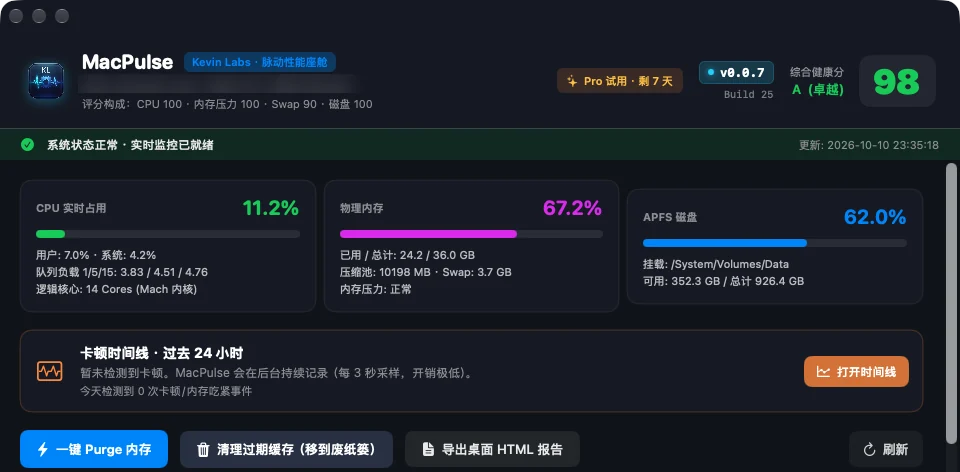
菜单栏和健康分实时告诉你 Mac 现在的状态:哪一项偏高、为什么。
The menu bar and health score show how your Mac is doing right now, and which area is under strain.
卡顿发生时自动记录,时间线用一句话说明是哪个应用、占了多少资源。
Slowdowns are recorded automatically; the timeline says which app was responsible and how much it used.
退出元凶应用、释放内存或清理过期缓存——每一步都先确认,结果如实显示。
Quit the culprit, purge memory or clear stale caches — each step asks first and reports the real result.
健康分是对当前负载的客观概括,不是警报。它每 3 秒根据实测数据计算一次,任何一项明显偏高时,总分会相应封顶,避免“一项很差但总分仍很高”。
The score is a factual summary of current load, not an alarm. It is recalculated every 3 seconds from measured values, and capped when any single area is clearly strained so one bad area is never hidden by a high total.
评级:A ≥ 90 · B ≥ 75 · C ≥ 60 · D ≥ 40 · F < 40。分数低只说明 Mac 此刻比较忙,关掉占资源的应用或重启通常就能恢复。
| 维度 Area | 权重 Weight | 依据 Based on |
|---|---|---|
| CPU | 25% | 实时占用与 1 分钟负载Live usage and 1-min load |
| 内存压力 Memory pressure | 35% | macOS 内核报告的内存压力等级Pressure level reported by macOS |
| Swap | 20% | 已用 Swap 占物理内存比例Swap used vs. physical memory |
| 磁盘剩余 Free disk | 20% | 数据卷剩余比例与剩余空间Free share and free space |
监控功能永久免费。首次启动自动获得 7 天 Pro 试用,无需付款信息;试用结束后免费功能照常可用。
Monitoring is free forever. The first launch includes a 7-day Pro trial with no payment details; free features keep working after it ends.
| 功能 Feature | 免费 Free | Pro |
|---|---|---|
| 实时监控与菜单栏Live monitoring & menu bar | ✓ | ✓ |
| 综合健康分Health score | ✓ | ✓ |
| Top CPU / 内存进程Top processes | ✓ | ✓ |
| 今日卡顿次数Today's slowdown count | ✓ | ✓ |
| 24 小时卡顿时间线与元凶归因24-hour lag timeline & culprit | — | ✓ |
| 一键 Purge 内存Memory purge | — | ✓ |
| 过期缓存清理(移到废纸篓)Stale cache cleanup (to Trash) | — | ✓ |
| 结束进程 / 退出应用Quit or end processes | — | ✓ |
| HTML 体检报告导出HTML report export | — | ✓ |
结账时会显示你所在地区的本地价格(含适用税费)。购买渠道即将开放。
Local prices, including applicable tax, are shown at checkout. Purchasing opens soon.
7 天无理由退款 · 7-day refund. 详见 退款政策 Refund Policy。
CPU、内存、进程与卡顿时间线只保存在你的 Mac 上(24 小时滚动),不会上传。
CPU, memory, process and timeline data stay on your Mac (rolling 24 hours) and are never uploaded.
不需要注册;App 和本网站都不含广告、分析统计或跟踪代码。
No sign-up. Neither the app nor this website contains ads, analytics or tracking code.
仅 Pro 激活与定期复核时发送激活码、App 随机安装标识和版本号。详见 隐私政策。
Only Pro activation and periodic re-checks send the license key, a random install ID and the app version. See the Privacy Policy.
需要 Apple Silicon(M 系列芯片)Mac,macOS 13 Ventura 或更新版本。目前不支持 Intel Mac。
An Apple Silicon (M-series) Mac running macOS 13 Ventura or later. Intel Macs are not supported at this time.
免费版正在完成 Apple 签名与公证,上线后会在这里提供下载。发邮件给我们即可在上线时收到通知。
The free version is being signed and notarized by Apple and will be available here soon. Email us to be notified.
Purge 调用的是 macOS 自带的系统命令,主要释放文件缓存,需要你输入管理员密码。MacPulse 会实测并显示实际释放了多少内存;macOS 本身也会按需回收内存,所以有时释放量不大,App 会如实告诉你。
Purge runs macOS's own system command, mainly releasing file caches, and needs your administrator password. MacPulse measures and shows the memory actually freed; macOS also reclaims memory on its own, so the gain is sometimes small and the app says so.
不会直接删除。只处理应用缓存目录里一小时内未修改的缓存文件夹,跳过数据库与锁文件,并移到废纸篓,你可以随时从废纸篓恢复。清倒废纸篓后空间才真正释放。
Nothing is deleted outright. Only stale cache folders are moved to the Trash (databases and lock files are skipped), so you can restore them. Space is freed when you empty the Trash.
购买后会得到一个激活码,在 App 的「升级 Pro」中粘贴即可。单机版可激活 2 台 Mac,家庭版 5 台;在旧 Mac 上停用即可把名额转给新 Mac。
After purchase you receive a license key to paste into the app. Single activates 2 Macs, Family 5; deactivate an old Mac to move its slot.
可以。监控功能完全离线运行;Pro 每次联网验证后可离线使用 7 天。
Yes. Monitoring works fully offline; Pro keeps working for 7 days after each online check.
购买后 7 天内可无理由全额退款,退款后授权自动停用,免费功能照常可用。详见 退款政策。
Yes — a full refund within 7 days of purchase, no questions asked. The license is then deactivated and free features keep working. See the Refund Policy.
不会。后台每 3 秒读取一次系统计数,主窗口关闭时只在菜单栏显示,开销很小。
No. It samples system counters every 3 seconds and stays in the menu bar when the main window is closed, with low overhead.