MacPulse tells you in plain words why your Mac is slow and which app caused it — then lets you switch to it or reveal it in Finder. No graphs or process tables to decode.
Activity Monitor shows hundreds of processes and a wall of numbers, and by the time you open it the slowdown is often over. Browsers and chat apps run dozens of helper processes scattered across the list, so it is hard to tell which app is really using the resources.
MacPulse takes a lightweight sample every few seconds. The moment a slowdown happens, it groups helper processes back into their app and records it in one sentence:
Example (translated) of the messages the app records
Illustration, not a screenshot
A 0–100 score computed live from CPU, memory pressure, swap and free disk space, with the weakest area named in one sentence.
Live CPU usage in the menu bar; click it for the health score and an overview without keeping the main window open.
Process lists sorted by CPU or memory, refreshed live.
Records sustained high CPU, memory pressure spikes and swap surges, groups helper processes into their app, pinpoints root causes, and lets you switch to the app or reveal it in Finder. Choose 24 hours, 7/30/90/365 days, all recorded history or custom dates. Export the selected range; recording gaps stay visible.
Recursively rolls up dozens of browser and framework helper processes into their main app, showing aggregated CPU, memory, and energy at a glance.
Choose which metrics to show in your menu bar (CPU, memory, disk, network) and customize capsule styles to fit your workflow.
Instantly switch to the lag-causing application window or reveal its executable bundle directly in Finder for safe inspection.
Exports an offline HTML report with the score and details to your Desktop, easy to keep or share.
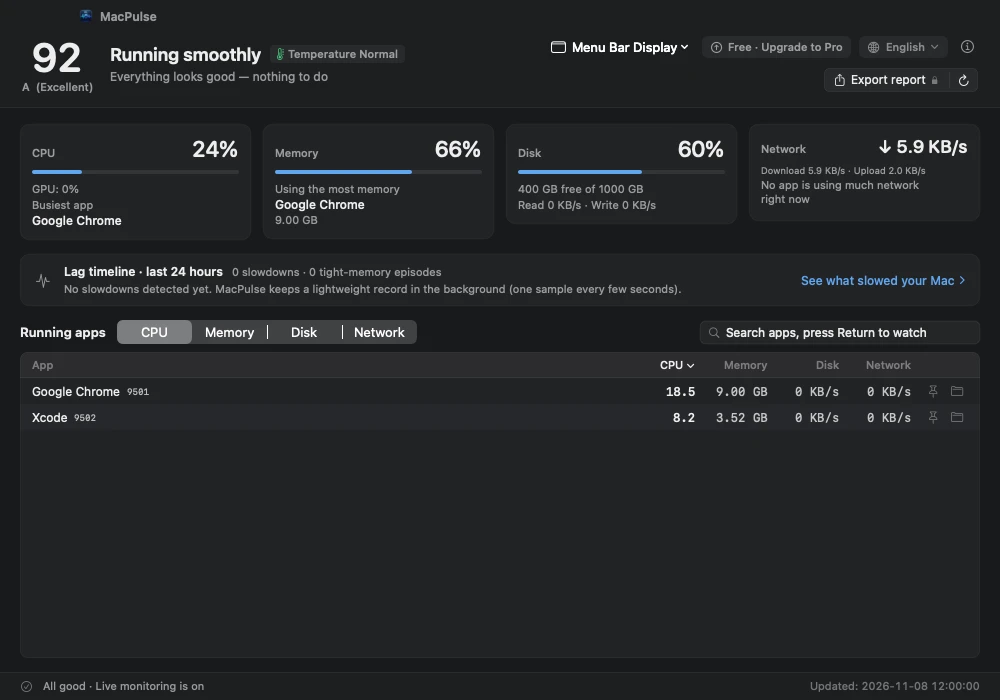
The menu bar and health score show how your Mac is doing right now, and which area is under strain.
Slowdowns are recorded automatically; the timeline says which app was responsible and how much it used.
Switch to the responsible app or reveal it in Finder to investigate — keep full control with zero risky system operations.
The score is a factual summary of the current load. It is recalculated every 3 seconds from measured values while MacPulse is open, and capped when any single area is clearly strained, so one weak area is never hidden by a high total.
Grades: A ≥ 90 · B ≥ 75 · C ≥ 60 · D ≥ 40 · F < 40. A low score only means your Mac is busy right now; quitting a heavy app or restarting usually brings it back.
| Area | Weight | Based on |
|---|---|---|
| CPU | 25% | Live usage and 1-minute load |
| Memory pressure | 35% | Pressure level reported by macOS |
| Swap | 20% | Swap used relative to physical memory |
| Free disk space | 20% | Share and amount of free space |
Monitoring is free forever. The first launch includes a 7-day Pro trial with no payment details required; free features keep working after it ends.
| Feature | Free | Pro |
|---|---|---|
| Live monitoring & menu bar | ✓ | ✓ |
| Health score | ✓ | ✓ |
| Top CPU / memory processes | ✓ | ✓ |
| Today's slowdown count | ✓ | ✓ |
| Long-range lag timeline | — | ✓ |
| App Family tree grouping | — | ✓ |
| Menu bar multi-metric customization | — | ✓ |
| One-click app switch & Finder reveal | — | ✓ |
| HTML report export | — | ✓ |
Black Friday · 50% off both plans worldwide. Ends November 30, 11:59 p.m. Pacific. Discount applied automatically at checkout.
Local prices and applicable taxes are shown at checkout.
7-day no-questions-asked refund. See the Refund Policy.
CPU, memory, process and timeline data stay on your Mac and are never uploaded. Timeline history is retained locally from the start of recording.
No sign-up needed. Neither the app nor this website contains ads, analytics or tracking code.
Only Pro activation and periodic re-checks send the license key, a random install ID and the app version. See the Privacy Policy.
A Mac with Apple Silicon (M-series chip) running macOS 13 Ventura or later. Intel Macs are not supported at this time.
Download the signed, notarized DMG, open it, and drag MacPulse into Applications. The first launch starts a 7-day Pro trial.
After purchase you receive a license key to paste into the app. Single activates 2 Macs, Family 5; deactivate an old Mac to move its slot to a new one.
Yes. Monitoring works fully offline; Pro keeps working for 7 days after each online check.
Yes — a full refund within 7 days of purchase, no questions asked. The license is then deactivated and free features keep working. See the Refund Policy.
No. It samples system counters every few seconds and stays in the menu bar when the main window is closed, with low overhead.